Tag

Latest News

SLIDE SHOW

Showing posts with label Miscelllanous. Show all posts

Creative Launches HQ -1400 Headphone

Posted by Ashim Adhikari on Friday, January 22, 2010 , under , | comments (0)


Creative Launches HQ -1400 Headphone

Posted on Jan 15, 2010
Creative, a brand mainly known for its MP3 players and PC speakers, also has a decent line up of headphones,including these sleek looking new models, one of them being the HQ-1400.

Sennheiser collaborate with Adidas to create sports Headphones

Posted by Ashim Adhikari on , under | comments (0)


Sennheiser collaborate with Adidas to create sports Headphones

Posted on Jan 12, 2010
The new Sennheiser earphone line, featuring four models the CX 680, MX 680, OMX 680, and the PMX 680 marks the first products based on the collaboration to hit stores. Adidas' expertise in the area of sweat-proof, water-proof, and cold-proof materials was essential to making a better work-out headphone, according to reps from Sennheiser.


  • Navigoan Announces Windows Mobile in Android Phones

    Posted by Ashim Adhikari on , under | comments (0)


    Navigoan Announces Windows Mobile in Android Phones

    Posted on Jan 09, 2010
    Navigon, one of the leading satellite navigation manufacturers has announced their navigation application for mobile phones that run on android and windows mobile platforms.Navigon Mobile Navigatorfor Windows Mobiles and Android Mobiles will feature Realistic View Pro that will allow the users to have 3D view of landmarks, road signs and lane guidance.

    PSP Go gets unboxed and hands-on; introduces pause-and-resume for multi-tasking

    Posted by Ashim Adhikari on Monday, December 28, 2009 , under , , | comments (0)


    PSP Go gets unboxed and hands-on; introduces pause-and-resume for multi-tasking 

    PSP Go hands-on

    The guys at GameSpot UK got their hands on the new PlayStation Portable Go – the latest version of the handheld console from Sony – and have just posted a detailed unboxing video of the same on their site.

    A couple of things stand out in the video, with the most promising new feature being the inclusion of the ability to pause your game. In the old PSP-3000 and all previous versions, the best you could do was quit the game if you wanted to perform some other task, such as watching a video. But in the new PSP Go, you can simply pause the game (although it takes a lot of time to do so), go back to the XrossMediaBar and head over to the videos section to watch a movie.

    This feature could be especially handy for games with checkpoints that are too far and few in-between. We have also found ourselves sometimes wishing for a feature like this when travelling in a crowded train. As playing the game becomes impossible, the option of pausing it to listen to music and then resume the game later, right where we left off, is absolutely fantastic in our books. Round of applause here, please?

    Apart from that, the other big change is that the PSP Go comes with a proprietary cable now. Gone are the days of using just any micro-USB cable you have handy with your PSP; Sony is back to its ‘use our cables and make us rich’ nonsense again.

    Part of the reason for this might be the fact that the PSP Go does not come with a TV-out port like the older versions. The GameSpot reviewers surmised that the new proprietary port might double up as a TV-out port – with another proprietary cable that you will have to buy, of course.

    Both the reviewers were also impressed with the build quality of the PSP Go, noting that the slider mechanism feels good, the analog nub has more resistance, the chrome buttons on the edge feel better than the plastic ones of old, and overall, the console has a ‘solid, but lighter’ feel to it.

    One line in the review did bother us though: Apparently the PSP Go can be synced up to only PCs and not Macs. Is this Sony’s way of welcoming the iPod Touch to the world of handheld video game consoles?

    SISO TABLO

    Posted by Ashim Adhikari on Sunday, December 20, 2009 , under | comments (0)


    SISO TABLO
    Tablo for laptop (model : TL-01 Series) is an innovative pen input device performing a full tablet function with simple installation. Tablo supports perfect tablet compatibility with Microsoft Windows XP and Vista and provides the finest handwriting, drawing, sketching and illustration with simple touch. This excellent pen mouse allows to maximize its convenience while using following software; Microsoft Windows Live messenger, Microsoft Office, Outlook, Journal Note, and Sticky Note and Adobe Photoshop, Illustrator, PDF, and many more programs where mouse is normally used. Create and personalize your documents with your own style!

    Tablo Advantage
    ▪ Easily transform normal laptop to powerful tablet PC
    ▪ Direct input on screen or on the air like Nintendo Wii with emotional handwriting (2D & 3D)
    ▪ Large coverage of laptop screen size up to 15.4��
    ▪ Perfect brush effect by speed pressure technology
    ▪ Plug & play on Microsoft Windows Vista & Office 2007
    ▪ Perfect tablet compatibility with Microsoft Windows XP by provided TABLO annotator software
    ▪ Convergence of Digital & Ink Pen
    ▪ Ultra portable tablet system
    ▪ Sleek & modern design


    Tablo Supported Software
    ▪ Microsoft Office (Word, PowerPoint, Excel, Outlook)
    ▪ Microsoft Windows Live Messenger
    ▪ Microsoft Sticky Note
    ▪ Microsoft Journal Note
    ▪ Microsoft Ink Desktop
    ▪ Microsoft Capture Tool
    ▪ Microsoft Paint
    ▪ Microsoft OneNote
    ▪ Adobe PDF
    ▪ Adobe Photoshop
    ▪ Adobe Illustrator
    ▪ Tablo Office Annotator for XP, Vista Home Basic
    ▪ Tablo Ink Desktop for XP, Vista Home Basic
    ▪ User applications using Microsoft Ink Library and playing games

    SISO TABLO

    Posted by Ashim Adhikari on , under | comments (0)


    SISO TABLO
    Tablo for laptop (model : TL-01 Series) is an innovative pen input device performing a full tablet function with simple installation. Tablo supports perfect tablet compatibility with Microsoft Windows XP and Vista and provides the finest handwriting, drawing, sketching and illustration with simple touch. This excellent pen mouse allows to maximize its convenience while using following software; Microsoft Windows Live messenger, Microsoft Office, Outlook, Journal Note, and Sticky Note and Adobe Photoshop, Illustrator, PDF, and many more programs where mouse is normally used. Create and personalize your documents with your own style!

    Tablo Advantage
    ▪ Easily transform normal laptop to powerful tablet PC
    ▪ Direct input on screen or on the air like Nintendo Wii with emotional handwriting (2D & 3D)
    ▪ Large coverage of laptop screen size up to 15.4��
    ▪ Perfect brush effect by speed pressure technology
    ▪ Plug & play on Microsoft Windows Vista & Office 2007
    ▪ Perfect tablet compatibility with Microsoft Windows XP by provided TABLO annotator software
    ▪ Convergence of Digital & Ink Pen
    ▪ Ultra portable tablet system
    ▪ Sleek & modern design


    Tablo Supported Software
    ▪ Microsoft Office (Word, PowerPoint, Excel, Outlook)
    ▪ Microsoft Windows Live Messenger
    ▪ Microsoft Sticky Note
    ▪ Microsoft Journal Note
    ▪ Microsoft Ink Desktop
    ▪ Microsoft Capture Tool
    ▪ Microsoft Paint
    ▪ Microsoft OneNote
    ▪ Adobe PDF
    ▪ Adobe Photoshop
    ▪ Adobe Illustrator
    ▪ Tablo Office Annotator for XP, Vista Home Basic
    ▪ Tablo Ink Desktop for XP, Vista Home Basic
    ▪ User applications using Microsoft Ink Library and playing games

    Review: Barnes & Noble's Nook

    Posted by Ashim Adhikari on Thursday, December 17, 2009 , under | comments (0)


    Review: Barnes & Noble's Nook
    Peter Svensson, Associated Press, December 10, 2009, New York
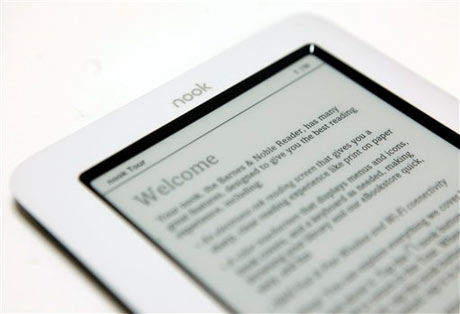
    The  is the gadget gift of the season. Both Sony and Barnes & Noble have sold out of their new models, and new buyers will have to wait until January for delivery. So why are e-book readers still such clumsy, annoying devices?

    I've been trying Barnes & Noble Inc.'s $259 Nook for a few days, and I'm not eager to prolong the acquaintance. Some of its problems are specific to the Nook, but most of them have to do with the screen technology the industry has settled on.

    It's known as electronic ink, and it looks more like a printed page than any other technology. It also doesn't consume a lot of power. But the disadvantages make these screens seem out of place today. They don't show color. They have no backlight. Most importantly, they're very slow to change from image to image. A regular LCD monitor updates its screen 60 times per second, while a fast e-ink screen might do so once per second.

    That means e-ink screens are very cumbersome to navigate. If you have a list of 10 books in your library, and your selection is marked by a highlight, it takes a second for that highlight to travel to a new selection. To users accustomed to the instant responses of computers and phones, this is what hell feels like.

    The Nook tries to get around the slowness of e-ink by including a small, fast, touch-sensitive color screen below the main, 6-inch e-ink screen. While the main screen shows the text of a book, the small screen offers navigation options such as switching to another book.

    This would have been a good idea if all the navigation took place on the color screen, but it doesn't. That screen is too small, so the Nook uses the e-ink screen to display lists of books, clickable links and so forth. Not only does your eye constantly have to travel between the screens to figure out your options, you also have to wait for the e-ink to update. The setup effectively shackles the color screen to the millstone of e-ink, and our voices rise from the depths of gadget hell.

    As if this wasn't enough, everyone I showed the Nook to tried to touch the e-ink screen. It's the natural thing to try because the color screen is touch sensitive, but it's a waste of time. Making the e-ink screen touch-sensitive as well would degrade its precious readability, apparently.

    There are numerous other problems with the interface, but Barnes & Noble says it's fixing a lot of them with a software update next week, so I won't dwell on the subject.

    Like Amazon.com Inc.'s groundbreaking Kindle, the Nook connects to a wireless data network, in this case AT&T Inc.'s. It backs that up with the ability to connect to Wi-Fi hot spots, something the Kindle doesn't do.

    The wireless connection lets users buy books directly on the Nook and read them right away. You can also subscribe to newspapers and have them show up every day, except that navigating a newspaper on the Nook will have you longing for a real paper.

    Barnes & Noble says the Nook's battery will last for eight to 10 days of regular reading. I had to recharge mine after four days, but that might have been because I used the color screen and the wireless connection quite a bit.

    Barnes & Noble claims to have 1 million publications in its library, and I didn't have any real problems finding reading materials at prices similar to Amazon's. Out of 32 fiction and nonfiction best sellers in The New York Times Book Review, Amazon has all but three, Barnes & Noble all but five. Most cost $9.99.

    As a book distribution system, Barnes & Noble has some things going for it. For instance, about half of its e-books can be "lent" to other people. That means e-books can now emulate the social exchange of printed books, while avoiding the big pitfall of book-lending: the risk that you won't get your book back. After two weeks, the book disappears from your friend's library and reappears in yours.

    Your friend doesn't need a Nook to read a book you're lending, because Barnes & Noble provides reader software for a variety of devices: BlackBerry phones, iPhones, iPod Touches and Windows and Mac PCs. Support for more smart phones is coming soon. Amazon has lagged in supporting other devices for its Kindle books, clearly preferring that people buy its $259 reader, though it has recently released PC and iPhone/iPod Touch software.

    The Barnes & Noble application for the iPhone is excellent, and I far prefer it to the Nook. It's free, too. A lot of people say they don't like reading books on an LCD screen, but many of them might change their minds if they turned down the brightness of the backlight.

    There are also "tablet" style computers and media players with screens larger than the iPhone. So far, none of them have been great e-book reading devices, but I think we'll see some next year. They might be more expensive than the current crop of e-book readers, but they also will be far more capable and user-friendly. In any case, the e-ink madness needs to stop.

    Review: Barnes & Noble's Nook

    Posted by Ashim Adhikari on , under | comments (0)


    Review: Barnes & Noble's Nook
    Peter Svensson, Associated Press, December 10, 2009, New York
    The  is the gadget gift of the season. Both Sony and Barnes & Noble have sold out of their new models, and new buyers will have to wait until January for delivery. So why are e-book readers still such clumsy, annoying devices?

    I've been trying Barnes & Noble Inc.'s $259 Nook for a few days, and I'm not eager to prolong the acquaintance. Some of its problems are specific to the Nook, but most of them have to do with the screen technology the industry has settled on.

    It's known as electronic ink, and it looks more like a printed page than any other technology. It also doesn't consume a lot of power. But the disadvantages make these screens seem out of place today. They don't show color. They have no backlight. Most importantly, they're very slow to change from image to image. A regular LCD monitor updates its screen 60 times per second, while a fast e-ink screen might do so once per second.

    That means e-ink screens are very cumbersome to navigate. If you have a list of 10 books in your library, and your selection is marked by a highlight, it takes a second for that highlight to travel to a new selection. To users accustomed to the instant responses of computers and phones, this is what hell feels like.

    The Nook tries to get around the slowness of e-ink by including a small, fast, touch-sensitive color screen below the main, 6-inch e-ink screen. While the main screen shows the text of a book, the small screen offers navigation options such as switching to another book.

    This would have been a good idea if all the navigation took place on the color screen, but it doesn't. That screen is too small, so the Nook uses the e-ink screen to display lists of books, clickable links and so forth. Not only does your eye constantly have to travel between the screens to figure out your options, you also have to wait for the e-ink to update. The setup effectively shackles the color screen to the millstone of e-ink, and our voices rise from the depths of gadget hell.

    As if this wasn't enough, everyone I showed the Nook to tried to touch the e-ink screen. It's the natural thing to try because the color screen is touch sensitive, but it's a waste of time. Making the e-ink screen touch-sensitive as well would degrade its precious readability, apparently.

    There are numerous other problems with the interface, but Barnes & Noble says it's fixing a lot of them with a software update next week, so I won't dwell on the subject.

    Like Amazon.com Inc.'s groundbreaking Kindle, the Nook connects to a wireless data network, in this case AT&T Inc.'s. It backs that up with the ability to connect to Wi-Fi hot spots, something the Kindle doesn't do.

    The wireless connection lets users buy books directly on the Nook and read them right away. You can also subscribe to newspapers and have them show up every day, except that navigating a newspaper on the Nook will have you longing for a real paper.

    Barnes & Noble says the Nook's battery will last for eight to 10 days of regular reading. I had to recharge mine after four days, but that might have been because I used the color screen and the wireless connection quite a bit.

    Barnes & Noble claims to have 1 million publications in its library, and I didn't have any real problems finding reading materials at prices similar to Amazon's. Out of 32 fiction and nonfiction best sellers in The New York Times Book Review, Amazon has all but three, Barnes & Noble all but five. Most cost $9.99.

    As a book distribution system, Barnes & Noble has some things going for it. For instance, about half of its e-books can be "lent" to other people. That means e-books can now emulate the social exchange of printed books, while avoiding the big pitfall of book-lending: the risk that you won't get your book back. After two weeks, the book disappears from your friend's library and reappears in yours.

    Your friend doesn't need a Nook to read a book you're lending, because Barnes & Noble provides reader software for a variety of devices: BlackBerry phones, iPhones, iPod Touches and Windows and Mac PCs. Support for more smart phones is coming soon. Amazon has lagged in supporting other devices for its Kindle books, clearly preferring that people buy its $259 reader, though it has recently released PC and iPhone/iPod Touch software.

    The Barnes & Noble application for the iPhone is excellent, and I far prefer it to the Nook. It's free, too. A lot of people say they don't like reading books on an LCD screen, but many of them might change their minds if they turned down the brightness of the backlight.

    There are also "tablet" style computers and media players with screens larger than the iPhone. So far, none of them have been great e-book reading devices, but I think we'll see some next year. They might be more expensive than the current crop of e-book readers, but they also will be far more capable and user-friendly. In any case, the e-ink madness needs to stop.

    Review: Wireless charging

    Posted by Ashim Adhikari on , under | comments (0)


    Review: Wireless charging
    Rachel Metz, Associated Press, October 8, 2009, San Francisco

    It's a pain to keep track of the chargers that go with cell phones, media players and other small electronics. It's even more annoying to stuff multiple power cords and adapters in your bag when you go out of town.

    What if you could charge things without plugging them in?

    I've started doing just that. I tested two mats that juice up small devices like iPods on contact, with only the mat plugged into an outlet rather than each gadget. The mats are far from perfect, requiring special sleeves and adapters for electronics. But there's something thrilling about cutting (most of) the cords.

    The first product I tried came from Powermat USA, which started selling two $100 mats this month.

    One of them is an oblong mat designed for home and office use, which impressed me right out of the box because it was easy to set up and compatible with lots of popular gadgets. Powermat also sells a rectangular one that folds into thirds for traveling.

    Both are available at Best Buy and Target, and are expected to start selling through Amazon.com next week.

    Each Powermat comes with a little white cube that sports a miniUSB connector the kind that goes into BlackBerrys and numerous other phones and eight different tips that fit the charging port on an iPhone, iPod, Sony PSP and other small electronics. Once you connect your gadget to the cube with the appropriate tip, you drop the cube onto the mat to start charging.

    You can skip the step of using the cube, but that will cost more money. Powermat sells plastic cases for devices such as the iPhone, iPod Touch and Nintendo DSi, along with special back covers for some BlackBerrys. All these let you charge the devices by simply plopping them down on the pad. There's also a small charging dock that fits an iPod or iPhone.

    These add-ons run $30 to $40. But it is much easier to keep the special case on an iPhone and then simply drop it on the pad when you need more juice.

    Each Powermat can charge three gadgets at once; magnets hold them in place. When you put a phone on the Powermat it emits a soft white light and a chirpy "zzwhip" sound to let you know it is properly connected. A somewhat opposite noise tells you when the connection is broken.

    Powermat uses induction to charge your electronics. Basically, when you drop a Powermat-enabled device on the mat, the two exchange a "handshake" using RFID, or radio-frequency identification technology. The mat identifies the device, determines how much power it needs, then starts transferring energy to it. Once a device is fully charged, Powermat will stop the electricity from flowing.

    More important to me than the process was the speed, and Powermat charged my gadgets pretty quickly. It took about an hour and a half to refill an iPod Nano, an iPhone, and an HTC myTouch smart phone. That was about as long as it took when I plugged the myTouch and iPhone into the wall with traditional adapters. The iPod Nano needed even more time in a wall outlet, at a little more than two hours.

    The other mat I tested, Duracell's myGrid ($80), was less impressive. It had sluggish charging times and more limited usability.

    Initially released in 2007 by a company called WildCharge Inc. and recently licensed by Duracell, the myGrid consists mostly of a flat plastic square topped with mirrored metal slats. It will be in some Target stores this month, and is due to hit Radio Shack stores later in the year.

    The pad will come with a few tips that plug into the bottom of cell phones. Those tips have to be connected to a "power clip," and a magnetic disk that you stick on the back of your phone helps keep the clip in place during charging. That's cumbersome. If all goes well, everything will stay connected, and a bright blue light on the side of the pad lets you know that your gadgets are being powered up.

    Of course, this is assuming you have a gadget that is compatible with the pad. MyGrid's Web site says the product works with several Nokia, Motorola and BlackBerry phones, and since the tip that fits these latter two categories is a miniUSB tip, it should also work with other devices that have this charging port. I was able to charge the myTouch with it, though its slightly curved back made it a little difficult to keep everything connected.

    If you have a BlackBerry Curve or Pearl or an iPod Touch you can buy a $35 rubber case that can also charge the gadget when you place it on the myGrid pad. I tested one that fits on the iPhone (it will be out in March) and found it super simple.

    MyGrid works differently than the Powermat, and requires that metal contact points on the clips and rubber sleeves be touching the pad for power to be transferred to your phone.

    It also took me longer to charge devices with the myGrid than with the Powermat: a bit more than 2 hours for an iPhone, and about four hours on a myTouch. I couldn't power up an iPod Nano because the Duracell pad lacks a compatible tip or case.

    The myGrid's advantage is that you can charge up to four devices at once instead of three, and it doesn't matter where you place them on the pad.

    But overall, because of its greater compatibility with gadgets and faster charging times, Powermat offers a better option, even if it is more expensive.

    Review: Wireless charging

    Posted by Ashim Adhikari on , under | comments (0)


    Review: Wireless charging
    Rachel Metz, Associated Press, October 8, 2009, San Francisco

    It's a pain to keep track of the chargers that go with cell phones, media players and other small electronics. It's even more annoying to stuff multiple power cords and adapters in your bag when you go out of town.

    What if you could charge things without plugging them in?

    I've started doing just that. I tested two mats that juice up small devices like iPods on contact, with only the mat plugged into an outlet rather than each gadget. The mats are far from perfect, requiring special sleeves and adapters for electronics. But there's something thrilling about cutting (most of) the cords.

    The first product I tried came from Powermat USA, which started selling two $100 mats this month.

    One of them is an oblong mat designed for home and office use, which impressed me right out of the box because it was easy to set up and compatible with lots of popular gadgets. Powermat also sells a rectangular one that folds into thirds for traveling.

    Both are available at Best Buy and Target, and are expected to start selling through Amazon.com next week.

    Each Powermat comes with a little white cube that sports a miniUSB connector the kind that goes into BlackBerrys and numerous other phones and eight different tips that fit the charging port on an iPhone, iPod, Sony PSP and other small electronics. Once you connect your gadget to the cube with the appropriate tip, you drop the cube onto the mat to start charging.

    You can skip the step of using the cube, but that will cost more money. Powermat sells plastic cases for devices such as the iPhone, iPod Touch and Nintendo DSi, along with special back covers for some BlackBerrys. All these let you charge the devices by simply plopping them down on the pad. There's also a small charging dock that fits an iPod or iPhone.

    These add-ons run $30 to $40. But it is much easier to keep the special case on an iPhone and then simply drop it on the pad when you need more juice.

    Each Powermat can charge three gadgets at once; magnets hold them in place. When you put a phone on the Powermat it emits a soft white light and a chirpy "zzwhip" sound to let you know it is properly connected. A somewhat opposite noise tells you when the connection is broken.

    Powermat uses induction to charge your electronics. Basically, when you drop a Powermat-enabled device on the mat, the two exchange a "handshake" using RFID, or radio-frequency identification technology. The mat identifies the device, determines how much power it needs, then starts transferring energy to it. Once a device is fully charged, Powermat will stop the electricity from flowing.

    More important to me than the process was the speed, and Powermat charged my gadgets pretty quickly. It took about an hour and a half to refill an iPod Nano, an iPhone, and an HTC myTouch smart phone. That was about as long as it took when I plugged the myTouch and iPhone into the wall with traditional adapters. The iPod Nano needed even more time in a wall outlet, at a little more than two hours.

    The other mat I tested, Duracell's myGrid ($80), was less impressive. It had sluggish charging times and more limited usability.

    Initially released in 2007 by a company called WildCharge Inc. and recently licensed by Duracell, the myGrid consists mostly of a flat plastic square topped with mirrored metal slats. It will be in some Target stores this month, and is due to hit Radio Shack stores later in the year.

    The pad will come with a few tips that plug into the bottom of cell phones. Those tips have to be connected to a "power clip," and a magnetic disk that you stick on the back of your phone helps keep the clip in place during charging. That's cumbersome. If all goes well, everything will stay connected, and a bright blue light on the side of the pad lets you know that your gadgets are being powered up.

    Of course, this is assuming you have a gadget that is compatible with the pad. MyGrid's Web site says the product works with several Nokia, Motorola and BlackBerry phones, and since the tip that fits these latter two categories is a miniUSB tip, it should also work with other devices that have this charging port. I was able to charge the myTouch with it, though its slightly curved back made it a little difficult to keep everything connected.

    If you have a BlackBerry Curve or Pearl or an iPod Touch you can buy a $35 rubber case that can also charge the gadget when you place it on the myGrid pad. I tested one that fits on the iPhone (it will be out in March) and found it super simple.

    MyGrid works differently than the Powermat, and requires that metal contact points on the clips and rubber sleeves be touching the pad for power to be transferred to your phone.

    It also took me longer to charge devices with the myGrid than with the Powermat: a bit more than 2 hours for an iPhone, and about four hours on a myTouch. I couldn't power up an iPod Nano because the Duracell pad lacks a compatible tip or case.

    The myGrid's advantage is that you can charge up to four devices at once instead of three, and it doesn't matter where you place them on the pad.

    But overall, because of its greater compatibility with gadgets and faster charging times, Powermat offers a better option, even if it is more expensive.