Latest News
Showing posts with label Laptops. Show all posts
Showing posts with label Laptops. Show all posts
Review: Sony Vaio X
Posted by Ashim Adhikari
on
Thursday, December 17, 2009
, under
Laptops
|
comments (0)
Review: Sony Vaio X
Peter Svensson, Associated Press, December 17, 2009, New York
 Netbooks have been a hit among laptop buyers because they're cheap and they're easy to carry. Now there's the option to pay a lot more and get a lot less a lot less weight, that is.
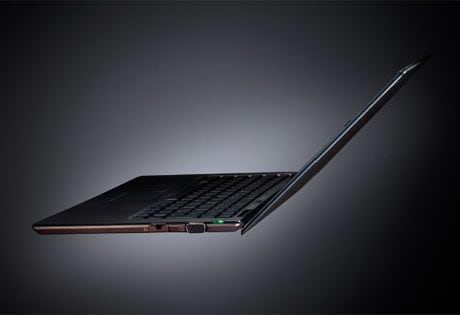
Sony's Vaio X is the runway model of netbooks: stylish, super-thin and without an ounce of weight to spare. It's expensive too: the base model is $1,300 at Sonystyle.com and Sony Style stores. The price is nearly four times as much as a standard netbook.
Its carbon-fiber body, just over half an inch thick, houses an 11.1-inch screen and weighs just 1.6 pounds. How light is that? Well, it nearly blew out of my hands one day when I was walking down the street with it opened. I'm not kidding. It makes 2.5-pound netbooks feel heavy. It makes the 3-pound MacBook Air seem like a dumbbell.
Sony says it's the world's thinnest, lightest laptop with a screen larger than 10 inches diagonally. Whatever the state of the competition may be, the light weight means that carrying the Vaio X around never really felt like a burden. It was a great companion on my commute, with a screen large enough to read comfortably on, and light enough to hold in one hand when standing, at least for short periods of time. For the ultimate in mobility, the computer has a built-in modem for Verizon Wireless' cellular broadband network. Service costs an extra $60 or so per month.
Of course, a mobile laptop isn't much good if it has poor battery life and constantly needs to be tethered to an outlet. The Vaio X does pretty well in this regard, at least if you consider the weight. On battery power, it lasted 1 hour and 47 minutes when playing high-definition video nonstop and accessing the Web via Wi-Fi. In more typical circumstances, this translates into about three hours of use.
The Vaio X also comes with a protruding extended battery with four times the capacity of the regular one. Together, you could get about 17 hours of work from them. The extended battery bumps the weight of the unit to 2.3 pounds.
The carbon fiber and aluminum frame is part of the reason the Vaio X can be so light. Like other netbooks, it uses an Intel Atom processor, which is small and doesn't run hot, so the Vaio X doesn't need a big ventilation fan or ducting to carry away heat. The unit also dispenses with the standard, disk-based hard drive. Instead, it has a "solid-state disk," or SSD, composed of flash memory chips that don't have moving parts.
The chief drawback of SSDs is that they have low capacities and high prices. The basic Vaio X has 64 gigabytes of storage. There's a model with twice as much for $1,500.
The small hard drive isn't likely to be a major impediment, however, because the Vaio X isn't capable of heavy-duty computing in any case. The Atom processor is good enough for e-mail, Web surfing and office applications, but will crawl when forced to do anything more demanding. Running the premium version of Windows 7 is already a bit of a struggle for it, and it doesn't have the processor power to play TV shows from Hulu without stuttering.
Other sacrifices to the design include feeble speakers and a somewhat flimsy feeling. The carbon-fiber cover isn't as good at repelling fingerprints as anodized metal or matte plastic, so the runway-ready looks can get grubby fast. The keys don't "give" much under the fingers, so extended typing can be uncomfortable.
The Vaio X does have a slot for SD memory cards, common in digital cameras, and an Ethernet jack for plugging into wired networks. Both are missing from the MacBook Air. The Sony model also comes with a GPS chip and navigation software, but I wasn't able to get it to work.
If you have the money and need something portable, the Vaio X is a nice choice indeed. Like most netbooks, it's best used as a backup for a standard laptop or desktop.
Review: Sony Vaio X
Posted by Ashim Adhikari
on , under
Laptops
|
comments (0)
Review: Sony Vaio X
Peter Svensson, Associated Press, December 17, 2009, New York
Netbooks have been a hit among laptop buyers because they're cheap and they're easy to carry. Now there's the option to pay a lot more and get a lot less a lot less weight, that is.Sony's Vaio X is the runway model of netbooks: stylish, super-thin and without an ounce of weight to spare. It's expensive too: the base model is $1,300 at Sonystyle.com and Sony Style stores. The price is nearly four times as much as a standard netbook.
Its carbon-fiber body, just over half an inch thick, houses an 11.1-inch screen and weighs just 1.6 pounds. How light is that? Well, it nearly blew out of my hands one day when I was walking down the street with it opened. I'm not kidding. It makes 2.5-pound netbooks feel heavy. It makes the 3-pound MacBook Air seem like a dumbbell.
Sony says it's the world's thinnest, lightest laptop with a screen larger than 10 inches diagonally. Whatever the state of the competition may be, the light weight means that carrying the Vaio X around never really felt like a burden. It was a great companion on my commute, with a screen large enough to read comfortably on, and light enough to hold in one hand when standing, at least for short periods of time. For the ultimate in mobility, the computer has a built-in modem for Verizon Wireless' cellular broadband network. Service costs an extra $60 or so per month.
Of course, a mobile laptop isn't much good if it has poor battery life and constantly needs to be tethered to an outlet. The Vaio X does pretty well in this regard, at least if you consider the weight. On battery power, it lasted 1 hour and 47 minutes when playing high-definition video nonstop and accessing the Web via Wi-Fi. In more typical circumstances, this translates into about three hours of use.
The Vaio X also comes with a protruding extended battery with four times the capacity of the regular one. Together, you could get about 17 hours of work from them. The extended battery bumps the weight of the unit to 2.3 pounds.
The carbon fiber and aluminum frame is part of the reason the Vaio X can be so light. Like other netbooks, it uses an Intel Atom processor, which is small and doesn't run hot, so the Vaio X doesn't need a big ventilation fan or ducting to carry away heat. The unit also dispenses with the standard, disk-based hard drive. Instead, it has a "solid-state disk," or SSD, composed of flash memory chips that don't have moving parts.
The chief drawback of SSDs is that they have low capacities and high prices. The basic Vaio X has 64 gigabytes of storage. There's a model with twice as much for $1,500.
The small hard drive isn't likely to be a major impediment, however, because the Vaio X isn't capable of heavy-duty computing in any case. The Atom processor is good enough for e-mail, Web surfing and office applications, but will crawl when forced to do anything more demanding. Running the premium version of Windows 7 is already a bit of a struggle for it, and it doesn't have the processor power to play TV shows from Hulu without stuttering.
Other sacrifices to the design include feeble speakers and a somewhat flimsy feeling. The carbon-fiber cover isn't as good at repelling fingerprints as anodized metal or matte plastic, so the runway-ready looks can get grubby fast. The keys don't "give" much under the fingers, so extended typing can be uncomfortable.
The Vaio X does have a slot for SD memory cards, common in digital cameras, and an Ethernet jack for plugging into wired networks. Both are missing from the MacBook Air. The Sony model also comes with a GPS chip and navigation software, but I wasn't able to get it to work.
If you have the money and need something portable, the Vaio X is a nice choice indeed. Like most netbooks, it's best used as a backup for a standard laptop or desktop.
Review: 3-D laptops
Posted by Ashim Adhikari
on , under
Laptops
|
comments (0)
Review: 3-D laptops
Peter Svensson, Associated Press, December 3, 2009, New York
 In its search for another technology to excite us, the consumer electronics industry is reaching deep into the third dimension. The big push for 3-D TV won't happen until next year, but already we can get a taste of 3-D in the home on laptops.
AsusTek Computer Inc. and Acer Inc. both have new models with screens that can show both games and movies in true 3-D, if you're willing to wear glasses.
Testing these has been fun. Many games work with 3-D screens, and if you fire up Batman: Arkham Asylum on the Asus unit the caped crusader will look so solid that it's tempting to try to reach through the screen to grab his neoprene-covered abs.
But the effect doesn't make the game seem more realistic. If anything, Batman looks more like an action figure than he does in 2-D. Seeing in 3-D on these small screens makes me feel like I'm peering into a dollhouse.
Such limitations to the technology make it hard to see 3-D screens as something that will provide long-term enjoyment, or become a must-have feature. Three-dimensional movie projection has come and gone in waves since the 1950s, and more than 50 years before that, people ogled 3-D photographs. Neither has had staying power.
These aren't the first 3-D laptops either. Sharp Inc. started selling one six years ago. The fact that you probably haven't heard of it is a good indicator of how successful it was.
What's new is that 3-D is now cheaper. While the Sharp model cost $3,300, the new Acer Aspire 5738DG has a list price of $780. The Asus G51JD lists for $1,700, but it's a powerful gaming laptop. Either model is only slightly more than an equivalent non-3-D model, so trying 3-D is no longer a big commitment. Both models have 15.6-inch widescreens and are of the heavy "desktop replacement" variety. The Acer weighs 6.3 pounds and the Asus 7.5 pounds.
We can "see" depth because our left and right eyes have a slightly different view of the world. To replicate that, a flat screen needs to project different images to each eye. Each of the laptops I've tried uses a different technology to get there.
To see 3-D on the Sharp laptop, you didn't need glasses, but you had to keep your head in a particular spot. The Acer model has the same drawback, but in addition, you need to wear glasses! If you move your head from the "sweet spot," you start to see, faintly, the images meant for the other eye, ruining the 3-D effect. It doesn't help that any light reflecting off the screen becomes very distracting in 3-D mode, so proper positioning of your head and the screen is difficult.
In addition, the screen's resolution of 1368 pixels by 768 pixels is effectively halved by switching to 3-D, because every other line on the screen is polarized for a different eye. This makes games look quite fuzzy, and it makes on-screen text hard to read.
The Asus model has a much more elaborate and robust 3-D solution. It comes with powered, rechargeable glasses made by Nvidia Corp. that alternately black out each eye in sync with the screen, which alternates the images it shows. A small infrared emitter that plugs into a USB port keeps the glasses timed to the screen. Nvidia sells the glasses and emitter separately for use with desktop computers and certain LCD monitors. The Asus model is the first laptop with a compatible LCD screen.
With Nvidia's solution, you don't need to keep your head in a particular place, and the shutters in the glasses are efficient enough that the image meant for one eye doesn't leak into the other, so the 3-D effect is quite convincing. Because the full screen is seen by each eye, there is no reduction in the resolution.
That doesn't mean it's better than regular 2-D. The glasses visibly flicker, and everything looks darker through them. One game I tried, Dragon Age: Origins worked well in 3-D, but when I tried World of Warcraft, some of the on-screen text appeared at the wrong depth, seemingly projecting far in front of the screen. I went cross-eyed for a moment, before ripping off the glasses and switching to 2-D. (Nvidia said it would try to fix the error.)
On the Acer, World of Warcraft failed the 3-D test in a different way: Objects cast shadows that fell in different directions for each eye, a weird and disconcerting effect.
Because games are internally rendered in three dimensions even for 2-D screens, it's a fairly minor technological twist to get them to display in 3-D with the proper screens. It's much harder to get 3-D movies. There's no established 3-D movie format yet, though a 3-D Blu-ray is in the works, and you can't buy the latest 3-D Hollywood movies for download either. For real 3-D movies, you're pretty much limited to a few short demo movies included with each 3-D laptop. The Acer, however, has a neat trick: It comes with software that turns any DVD into a 3-D experience. It does that by guessing which objects go in the foreground and which go in the back. It doesn't get everything right, but it is pretty interesting for a while, and it's probably the best thing about the 3-D experience on the Acer.
My guess is that anyone who gets one of these will quickly tire of the 3-D feature, and forget about it once they've misplaced the glasses. The good news is that those who do will be left with capable laptops for plain ol' 2-D enjoyment.
The Acer is a fine machine for work, browsing, light gaming and DVD viewing. Hardcore gamers may regret the Asus model's relatively low screen resolution of 1368 pixels by 768 pixels and its lack of what is known as a RAID array to speed up its hard drive. It does have an Intel Core i7 processor, the most powerful kind available for laptops, and a good graphics card.
Review: 3-D laptops
Posted by Ashim Adhikari
on , under
Laptops
|
comments (0)
Review: 3-D laptops
Peter Svensson, Associated Press, December 3, 2009, New York
In its search for another technology to excite us, the consumer electronics industry is reaching deep into the third dimension. The big push for 3-D TV won't happen until next year, but already we can get a taste of 3-D in the home on laptops.AsusTek Computer Inc. and Acer Inc. both have new models with screens that can show both games and movies in true 3-D, if you're willing to wear glasses.
Testing these has been fun. Many games work with 3-D screens, and if you fire up Batman: Arkham Asylum on the Asus unit the caped crusader will look so solid that it's tempting to try to reach through the screen to grab his neoprene-covered abs.
But the effect doesn't make the game seem more realistic. If anything, Batman looks more like an action figure than he does in 2-D. Seeing in 3-D on these small screens makes me feel like I'm peering into a dollhouse.
Such limitations to the technology make it hard to see 3-D screens as something that will provide long-term enjoyment, or become a must-have feature. Three-dimensional movie projection has come and gone in waves since the 1950s, and more than 50 years before that, people ogled 3-D photographs. Neither has had staying power.
These aren't the first 3-D laptops either. Sharp Inc. started selling one six years ago. The fact that you probably haven't heard of it is a good indicator of how successful it was.
What's new is that 3-D is now cheaper. While the Sharp model cost $3,300, the new Acer Aspire 5738DG has a list price of $780. The Asus G51JD lists for $1,700, but it's a powerful gaming laptop. Either model is only slightly more than an equivalent non-3-D model, so trying 3-D is no longer a big commitment. Both models have 15.6-inch widescreens and are of the heavy "desktop replacement" variety. The Acer weighs 6.3 pounds and the Asus 7.5 pounds.
We can "see" depth because our left and right eyes have a slightly different view of the world. To replicate that, a flat screen needs to project different images to each eye. Each of the laptops I've tried uses a different technology to get there.
To see 3-D on the Sharp laptop, you didn't need glasses, but you had to keep your head in a particular spot. The Acer model has the same drawback, but in addition, you need to wear glasses! If you move your head from the "sweet spot," you start to see, faintly, the images meant for the other eye, ruining the 3-D effect. It doesn't help that any light reflecting off the screen becomes very distracting in 3-D mode, so proper positioning of your head and the screen is difficult.
In addition, the screen's resolution of 1368 pixels by 768 pixels is effectively halved by switching to 3-D, because every other line on the screen is polarized for a different eye. This makes games look quite fuzzy, and it makes on-screen text hard to read.
The Asus model has a much more elaborate and robust 3-D solution. It comes with powered, rechargeable glasses made by Nvidia Corp. that alternately black out each eye in sync with the screen, which alternates the images it shows. A small infrared emitter that plugs into a USB port keeps the glasses timed to the screen. Nvidia sells the glasses and emitter separately for use with desktop computers and certain LCD monitors. The Asus model is the first laptop with a compatible LCD screen.
With Nvidia's solution, you don't need to keep your head in a particular place, and the shutters in the glasses are efficient enough that the image meant for one eye doesn't leak into the other, so the 3-D effect is quite convincing. Because the full screen is seen by each eye, there is no reduction in the resolution.
That doesn't mean it's better than regular 2-D. The glasses visibly flicker, and everything looks darker through them. One game I tried, Dragon Age: Origins worked well in 3-D, but when I tried World of Warcraft, some of the on-screen text appeared at the wrong depth, seemingly projecting far in front of the screen. I went cross-eyed for a moment, before ripping off the glasses and switching to 2-D. (Nvidia said it would try to fix the error.)
On the Acer, World of Warcraft failed the 3-D test in a different way: Objects cast shadows that fell in different directions for each eye, a weird and disconcerting effect.
Because games are internally rendered in three dimensions even for 2-D screens, it's a fairly minor technological twist to get them to display in 3-D with the proper screens. It's much harder to get 3-D movies. There's no established 3-D movie format yet, though a 3-D Blu-ray is in the works, and you can't buy the latest 3-D Hollywood movies for download either. For real 3-D movies, you're pretty much limited to a few short demo movies included with each 3-D laptop. The Acer, however, has a neat trick: It comes with software that turns any DVD into a 3-D experience. It does that by guessing which objects go in the foreground and which go in the back. It doesn't get everything right, but it is pretty interesting for a while, and it's probably the best thing about the 3-D experience on the Acer.
My guess is that anyone who gets one of these will quickly tire of the 3-D feature, and forget about it once they've misplaced the glasses. The good news is that those who do will be left with capable laptops for plain ol' 2-D enjoyment.
The Acer is a fine machine for work, browsing, light gaming and DVD viewing. Hardcore gamers may regret the Asus model's relatively low screen resolution of 1368 pixels by 768 pixels and its lack of what is known as a RAID array to speed up its hard drive. It does have an Intel Core i7 processor, the most powerful kind available for laptops, and a good graphics card.

 Posts
Posts


